
Brand Character: How Image-to-Logo Redefines Visual Identity
Contents
- Why Brand Character Is the Most Underrated Growth Asset
- Understanding Image to Logo — The AI Technology That's Rebuilding Brand Character
- Step-by-Step Guide — How to Build Brand Character Using Image to Logo on The LogoCreator
- Step 1 — Choosing the Right Reference Image for Maximum Brand Character Output
- Step 2 — Selecting the Logo Style That Matches Your Brand Character Dimension
- Step 3 — Writing the Perfect Text Prompt to Direct Brand Character Expression
- Step 4 — Generating, Iterating, and A/B Testing Your Brand Character Logo
- Step 5 — Downloading and Deploying Your Logo Across Brand Touchpoints
- Brand Character in Action — Image to Logo Use Cases Across 6 Industries
- Use Case 1 — E-Commerce & Etsy Sellers: Product Photo to Brand Character Logo
- Use Case 2 — Tech Startups: Turning Product Imagery Into a Competence-Driven Brand Character
- Use Case 3 — Content Creators & Personal Brands: Photo to Brand Character Mascot
- Use Case 4 — Food & Beverage Brands: From Ingredient Photos to Warm Brand Character
- Use Case 5 — Pet Owners & Pet Brands: Turning Your Pet's Photo Into a Brand Character Mascot
- Use Case 6 — Fitness & Sports Brands: Bold Brand Character From Action Imagery
- Advanced Brand Character Tips — Getting More From Your Image to Logo Workflow
- Common Brand Character Mistakes to Avoid When Using Image to Logo Tools
- Mistake 1 — Uploading Cluttered Images That Kill Brand Character Clarity
- Mistake 2 — Using Vague Prompts That Produce Generic Brand Character
- Mistake 3 — Stopping at One Generation Without Exploring Brand Character Variations
- Mistake 4 — Skipping Small-Size Brand Character Visibility Testing
- Mistake 5 — Using Photo-Filter Outputs as Brand Logos Instead of True Brand Character Marks
- Frequently Asked Questions About Brand Character and Image to Logo
- Conclusion — Your Brand Character Is Already in the Photo You Have Right Now
Why Brand Character Is the Most Underrated Growth Asset of 2026
Here's a number worth pausing on: $8,000. That's what a professional brand identity used to cost — plus weeks of revisions and a final logo that might not even feel right.
Today? Upload a photo, add a few words, and you have a professional logo in 60 seconds. That's not luck. That's AI image to logo technology.
Three things are pushing this shift. Mobile attention lasts milliseconds — your logo has 0.05 seconds before someone scrolls past. AI design tools have removed the skill barrier entirely. And the creator economy means millions of personal brands now need to stand out visually, fast.
This guide covers it all: what brand character means, how image to logo AI works, a step-by-step workflow, real industry use cases, advanced tips, and the common mistakes that kill brand character before it starts.
What Is Brand Character, and Why Does Your Logo Have to Express It?
Stanford professor Jennifer Aaker mapped brand character into five dimensions: Sincerity (warm, genuine), Excitement (bold, imaginative), Competence (reliable, intelligent), Sophistication (glamorous, charming), and Ruggedness (tough, outdoorsy).
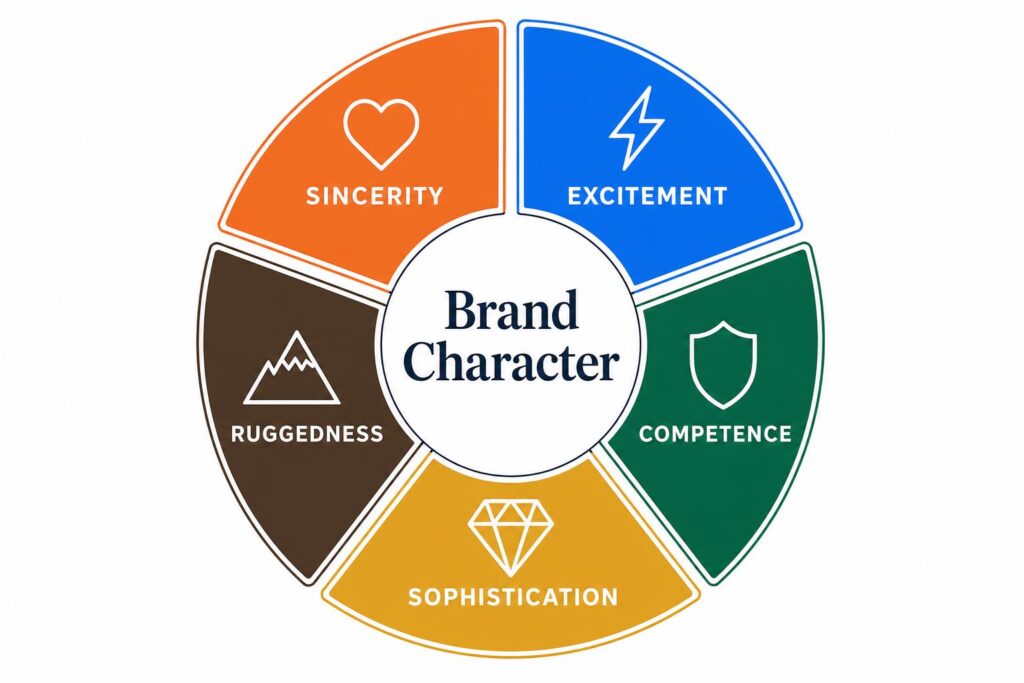
Nike is Ruggedness + Excitement — punchy and athletic before you read a word. Apple is Sophistication + Competence — minimal, precise, quietly confident. That's brand character doing its job.
The best brand character examples for small businesses work the same way: a candle shop that feels warm and trustworthy, a fitness brand that feels bold and driven, a bakery that feels genuinely inviting. The dimension doesn't change with your budget — only the execution does.
Most small brand logos "look fine" — clean, professional-ish, inoffensive. But swap the name out and you couldn't tell them apart. That's not a design problem. That's a brand character problem.
The brain processes visuals 60,000 times faster than text. First impressions form in under 200 milliseconds. Your logo isn't decoration — it's your brand character's first and loudest sentence.
The Three Reasons Brands Fail to Build Real Brand Character
① The Translation Gap. Most founders know exactly what their brand should feel like. They just can't convert that feeling into a design brief that a designer can execute. "Make it feel premium but approachable" sounds meaningful in your head and completely useless in a creative meeting. The result: a logo that reflects the designer's interpretation, not the brand's actual character.
② The Cost Trap. Traditional design is iterative and expensive. Brief → concept → revision → revision → revision → final. Every time you want to explore a different direction, the clock and the invoice both restart. Most business owners settle somewhere in the middle — not because they love the result, but because they've run out of budget to keep trying.
③ The Input Gap. You have a perfect visual reference on your phone — a texture, an outline, an atmosphere that captures exactly what your brand should feel like. Traditional design tools don't accept images as input. You're stuck describing a feeling in words, which is a bit like trying to explain a color to someone over the phone. Something always gets lost.
Image to Logo AI closes all three gaps at once. Here's how the technology actually works — and why 2026 is the year it becomes mainstream.
Understanding Image to Logo — The AI Technology That's Rebuilding Brand Character
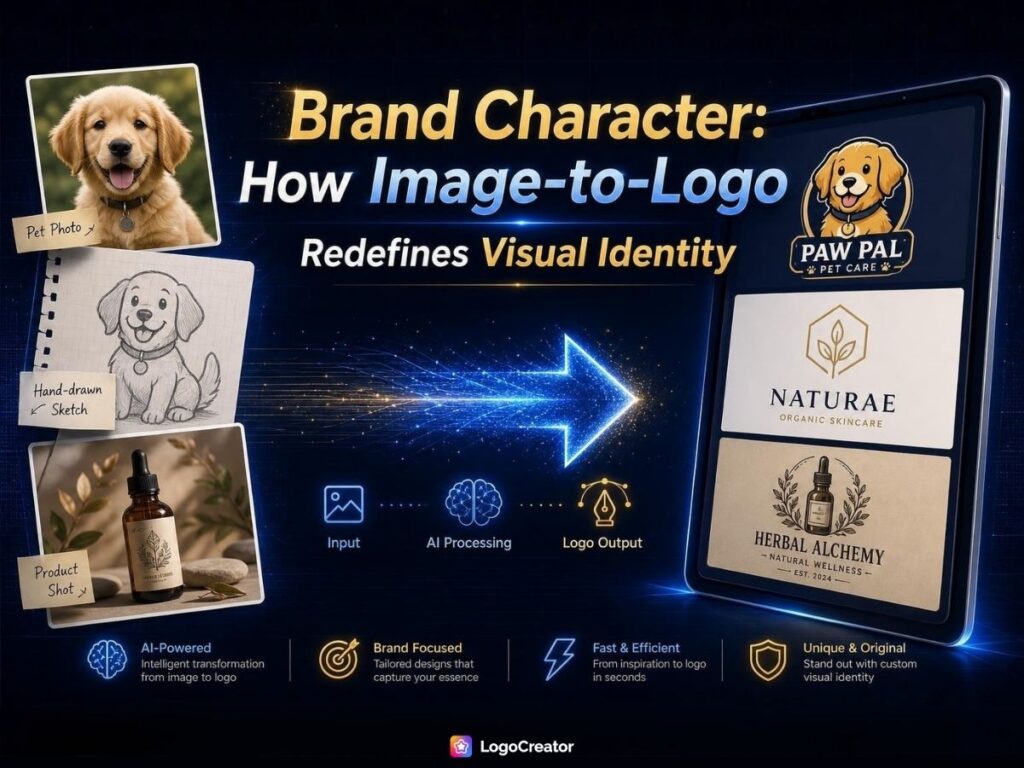
Let's get one thing straight before we go any further: image to logo is not a filter. It is not the same as slapping a vintage preset on your photo or running it through an artistic effect. A filter changes how your photo looks. Image to logo technology changes what your photo becomes — a semantic reinterpretation of your visual reference into something brand-ready and scalable.
How AI Image to Logo Technology Works: Feature Extraction and Stylization
When you upload an image, three things happen:
Semantic Understanding. A traditional auto-tracing tool sees pixel contrast. AI sees intent. Upload a cat photo and it knows to preserve the ear silhouette, simplify the whiskers to bold lines, and render the eyes as clean geometric shapes. It's not reading pixels — it's reading concept.
Color Reduction. Photos contain millions of colors. Logos need one to three. The AI identifies which tones carry the most visual weight and collapses the palette down to brand-usable colors — what a designer does manually in Illustrator, but in seconds.
Feature Exaggeration. Details that look great at full size vanish at favicon scale. The AI knows which features carry brand character and exaggerates them just enough to stay readable at 16×16 pixels. That's what separates a logo from a shrunken photo.
The LogoCreator adds a dual-input system: your image anchors the visual direction, your text prompt steers the style. That's how the same photo can produce a vintage artisan mark, a bold geometric icon, or a playful mascot — practical brand character examples for small businesses that would otherwise require a designer and a budget to achieve.
Image to Logo vs. Traditional Design vs. Template Tools — A Brand Character Comparison
| Feature | Traditional Designer | Template Logo Maker | AI Image to Logo |
|---|---|---|---|
| Design Input | Written brief | Keyword / industry selection | Your reference image |
| Brand Character Precision | High (when communication works) | Low — templates are shared globally | Medium-high — image = built-in differentiation |
| Iteration Speed | Days to weeks | Instant but limited | Seconds, unlimited variants |
| Uniqueness | High (and expensive) | Low — any competitor can use the same template | High — no one has your image |
| Starting Cost | $500–$15,000 | Free–$50/month | Free to start |
| Best For | Established brands with budget | Brands that don't care about character | Everyone in this article |
The key insight: image to logo's advantage isn't price — it's that your image is inherently yours. No template library in the world can replicate what you get when the input is a photo...
The key insight: image to logo's advantage isn't price — it's that your image is inherently yours. No template library in the world can replicate what you get when the input is a photo of your actual product, your actual pet, or your actual hand-drawn concept.
Step-by-Step Guide — How to Build Brand Character Using Image to Logo on The LogoCreator
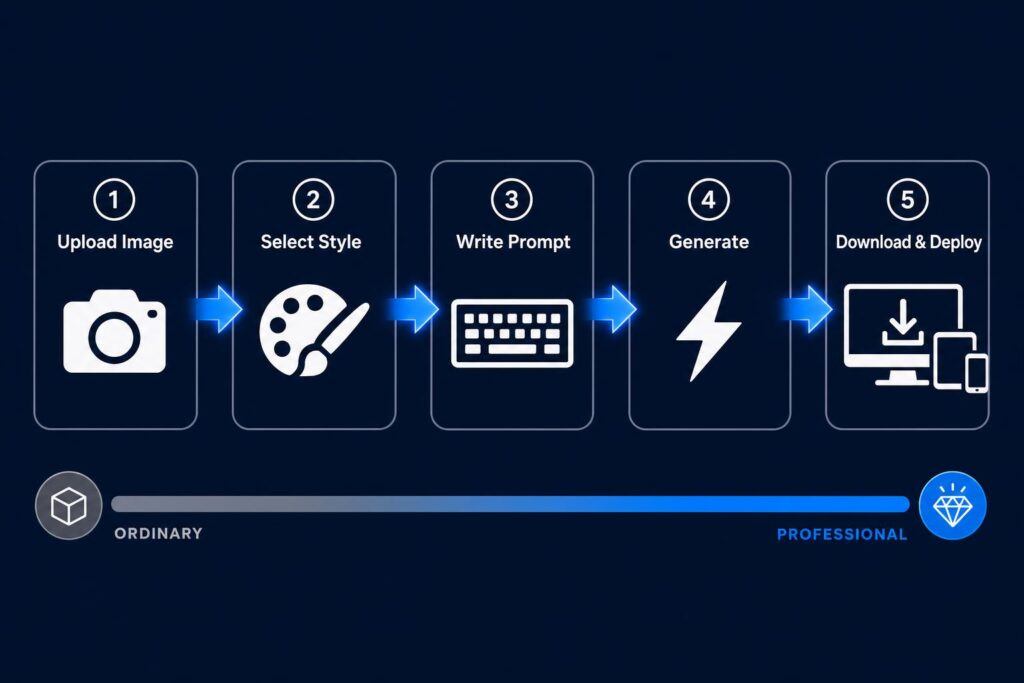
The old workflow was: describe what you want, wait for a designer to interpret it, review it, ask for changes, wait again. The new workflow is: show what you want, generate, iterate, done. That shift — from describe-and-wait to show-and-generate — is the most significant workflow change in branding since desktop design software arrived in the 1990s. Here's exactly how to do it in five steps.
Step 1 — Choosing the Right Reference Image for Maximum Brand Character Output
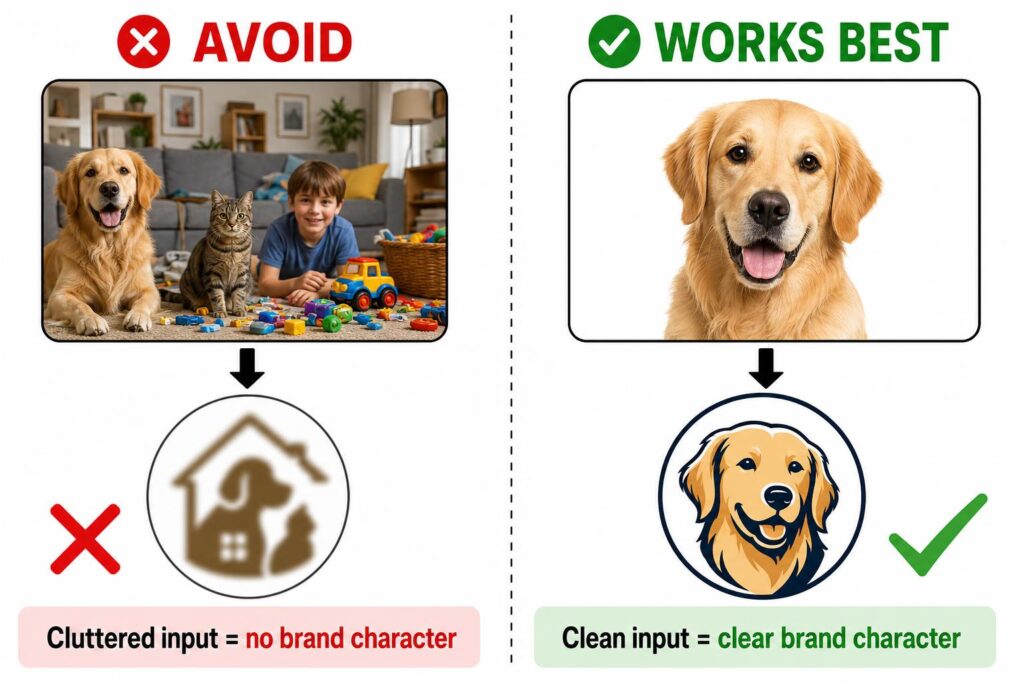
The image you upload is the raw material. Put good material in, get good brand character out. Put noise in, get confusion out.
What works well:
- ✓ Single subject — a product, a pet, a portrait, an object, a hand-drawn sketch
- ✓ Clean or solid-color background; subject takes up at least 60% of the frame
- ✓ Natural lighting, avoiding severe overexposure or shadow
- ✓ PNG or JPG format
What to avoid:
- ✗ Multi-subject, scene-heavy photos (the AI's attention gets split)
- ✗ Existing logos as reference (technically possible, commercially unwise)
- ✗ Images under 200×200px — blurry inputs produce blurry brand character
Pro Tip:
Before uploading, shoot with your phone's Portrait mode to auto-blur the background. Or run the image through remove.bg to strip the background entirely. The cleaner the subject isolation, the more precisely the AI can extract your brand character signal from visual noise.
Step 2 — Selecting the Logo Style That Matches Your Brand Character Dimension
This is where most people make an aesthetic choice when they should be making a strategic one. Your style selection isn't about what you think looks cool — it's about which visual language communicates the right brand character dimension to your specific audience.
| Logo Style | Brand Character Dimension | Best Industry Fit |
|---|---|---|
| Geometric | Competence — precise, trustworthy | Tech, finance, consulting |
| Icon-style | Sincerity — genuine, accessible | Food, services, education |
| Cartoon Mascot | Excitement — bold, memorable | Content creators, kids brands, entertainment |
| Minimal Monogram | Sophistication — refined, premium | Fashion, beauty, personal brands |
| Bold / Dynamic | Ruggedness — strong, unapologetic | Sport, fitness, outdoor |
Still not sure? Try this: if your brand were a person walking into a room, would they be confident and precise , warm and approachable , loud and energetic , elegant and restrained , or bold and rebellious? Your answer maps directly to a style. Trust it.
Step 3 — Writing the Perfect Text Prompt to Direct Brand Character Expression
Here's the part most tutorials skip because it requires actual thinking. Your prompt is the steering wheel of the whole process — and a vague prompt produces a generic logo with zero brand character. The fix is a four-element formula:
**[Style Adjective] + [Industry/Context] + [Color Direction] + [Mood Keyword]**
Six ready-to-use examples for the most common brand character scenarios:
- Handmade / E-commerce: "Handcrafted, artisanal shop logo, warm terracotta and cream tones, vintage and trustworthy"
- Tech startup: "Clean geometric logo, tech startup, electric blue and white, forward-thinking and precise"
- Food & beverage: "Cozy café icon, warm amber and dark brown, hand-lettered feel, welcoming and authentic"
- Content creator / personal IP: "Bold character mascot, social media creator brand, vibrant coral and navy, energetic and memorable"
- Pet brand: "Cute cartoon pet mascot, pastel pink and mint, playful and friendly, pet care brand"
- Fitness / sport: "Bold athletic logo, strong angular lines, deep charcoal and neon yellow, powerful and motivational"
One more thing on color: don't just say "blue." Say "deep navy blue with warm gold accents, trustworthy and premium." The precision of your color language directly determines the precision of the brand character you get back. As a quick reference:
- 🔴 Red / Orange → passion, urgency, appetite
- 🔵 Blue / Navy → trust, professionalism, calm
- 🟢 Green → growth, nature, health
- ⚫ Black / Gold → sophistication, luxury, timelessness
- 🌸 Pastels → approachability, creativity, youth
Step 4 — Generating, Iterating, and A/B Testing Your Brand Character Logo
Here's a mindset shift that will immediately improve your results: iteration is not failure. It's the feature. With traditional design, every revision round costs time and money. With AI generation, every new version costs you approximately zero. Stop treating the first output as the answer.
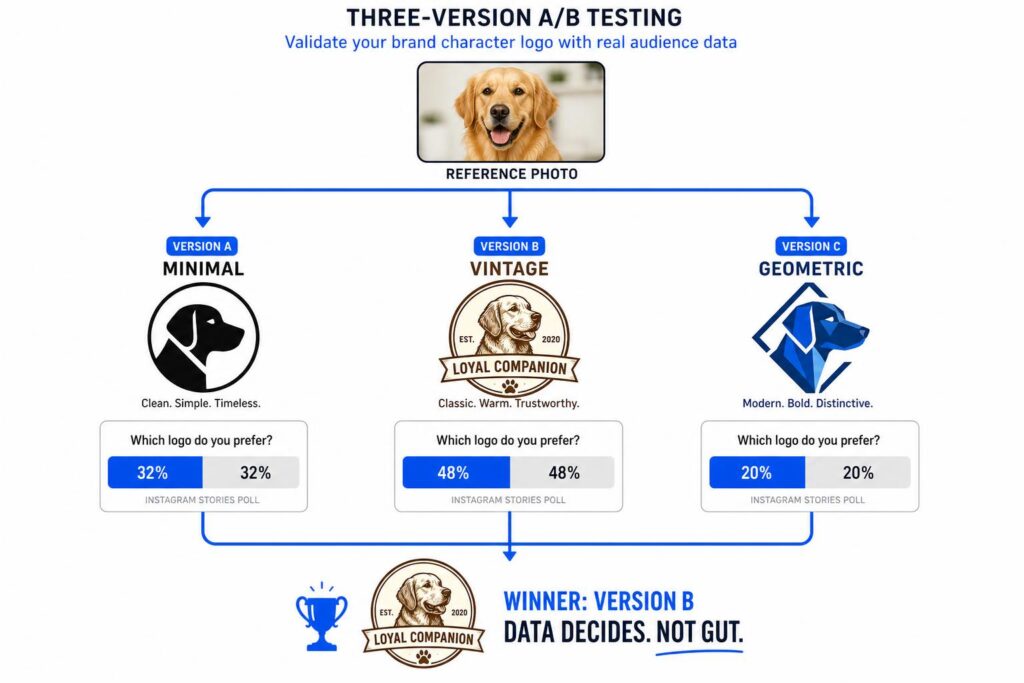
Try this three-version approach: from the same reference image, generate three distinct style versions — Version A minimal and single-color, Version B vintage and textured, Version C bold and geometric. Screenshot all three side by side. Then publish the comparison to your Instagram Stories or a community poll. Let your actual audience tell you which brand character resonates with them.
Pro Tip:
The same product photo in Vintage mode gives you warmth and nostalgia. In Geometric mode, it gives you precision and modernity. Those are two completely different brand character positions — both useful, both coming from exactly the same source image. Keep both for different contexts and campaigns.
Step 5 — Downloading and Deploying Your Logo Across Brand Touchpoints
The LogoCreator exports high-quality JPG files ready for immediate use across digital and print applications. Once downloaded, deploy to:
- ✓ Social media profiles (Instagram / YouTube / TikTok / LinkedIn / X)
- ✓ E-commerce storefronts (Etsy / Shopify / Amazon)
- ✓ Business cards and print materials
- ✓ Digital banners, cover images, marketing assets
- ✓ Email signatures
- ✓ Website favicon and header
Build your brand consistency system in three moves: (1) Save the reference image and prompt you used — future iterations should start from the same foundation. (2) Extract the exact HEX color codes from your logo using a color picker tool. (3) Test the logo on both white and dark backgrounds before locking it in.
Recommended supporting tools: remove.bg (background removal before upload) · Coolors.co (build a full brand palette from your logo colors) · Smartmockups (preview your logo in real-world scenes) · Canva free tier (create matching social media templates)
Brand Character in Action — Image to Logo Use Cases Across 6 Industries
Here's the part where you stop reading generically and start seeing yourself. Regardless of what kind of business you're building or creator you are, one of these six scenarios almost certainly describes your exact situation. Each one is a real-world example of brand character being expressed through image to logo — and each one shows a different dimension of what this technology can actually do.
Use Case 1 — E-Commerce & Etsy Sellers: Product Photo to Brand Character Logo
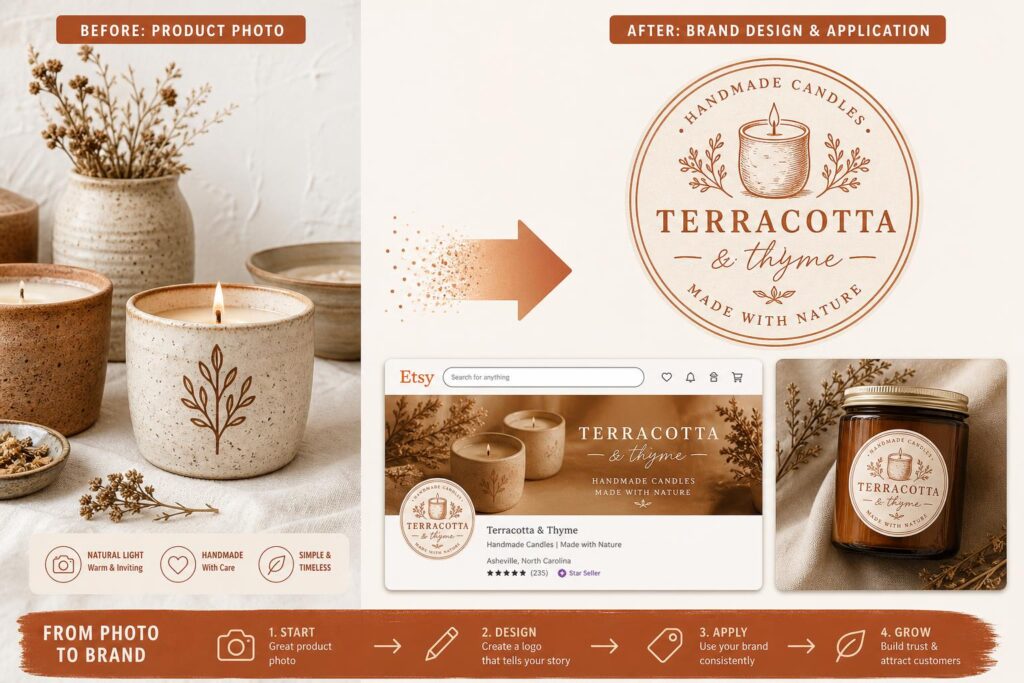
You make things with your hands — candles, ceramics, jewelry, leather goods — and you're brilliant at the craft. The problem is your brand still looks like it was assembled in a hurry at 2am before a market stall. You have great product photos but no visual identity to match.
Upload that product photo. Select Vintage or Icon-style. Prompt: "Handcrafted, artisanal, warm earth tones, shop logo." What you get is a brand character logo that communicates Sincerity — genuine craft, approachable quality — which is exactly what Etsy shoppers are looking for before they click Buy. Use it on your storefront, product labels, packaging stickers, and social profile. It's the visual credibility your craft deserves.
Use Case 2 — Tech Startups: Turning Product Imagery Into a Competence-Driven Brand Character
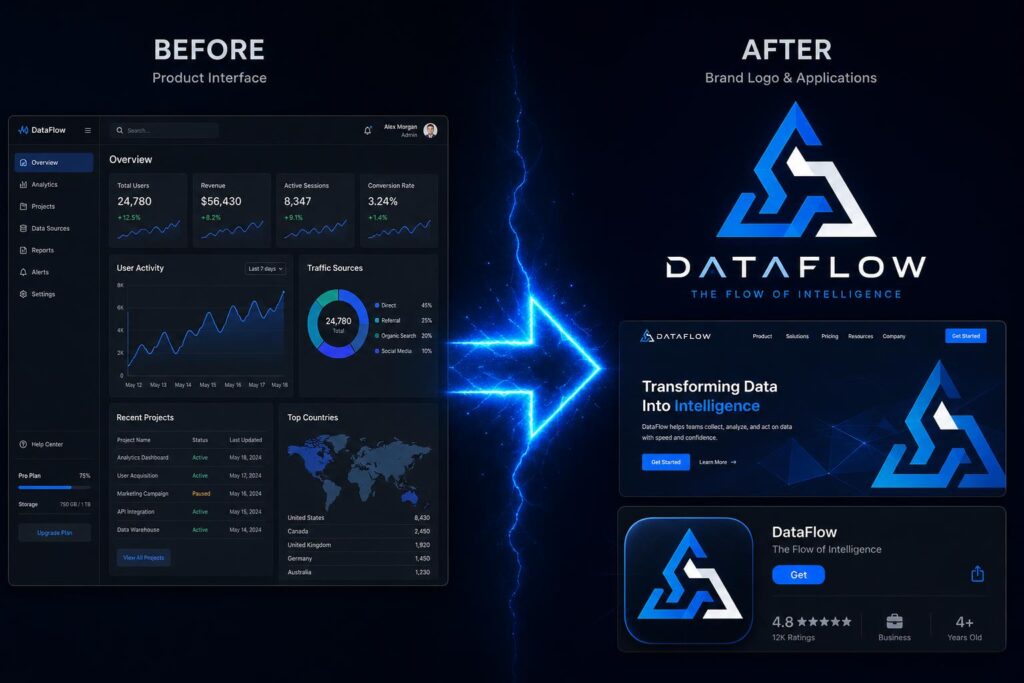
You're building a SaaS tool, an app, or a digital product, and you know what your product does better than anyone. But your current logo looks like it came from a 2014 startup template generator. Investors have seen it before. Users have seen it before. It says nothing about what makes you different.
Take a screenshot of your product interface or a clean render of your product concept. Geometric style. Prompt: "Clean geometric logo, tech startup, electric blue, precise and forward-thinking." The output expresses Competence — which is the exact brand character dimension that converts a skeptical investor or a first-time user into a believer. Use it on your website header, App Store icon, and pitch deck cover.
Use Case 3 — Content Creators & Personal Brands: Photo to Brand Character Mascot
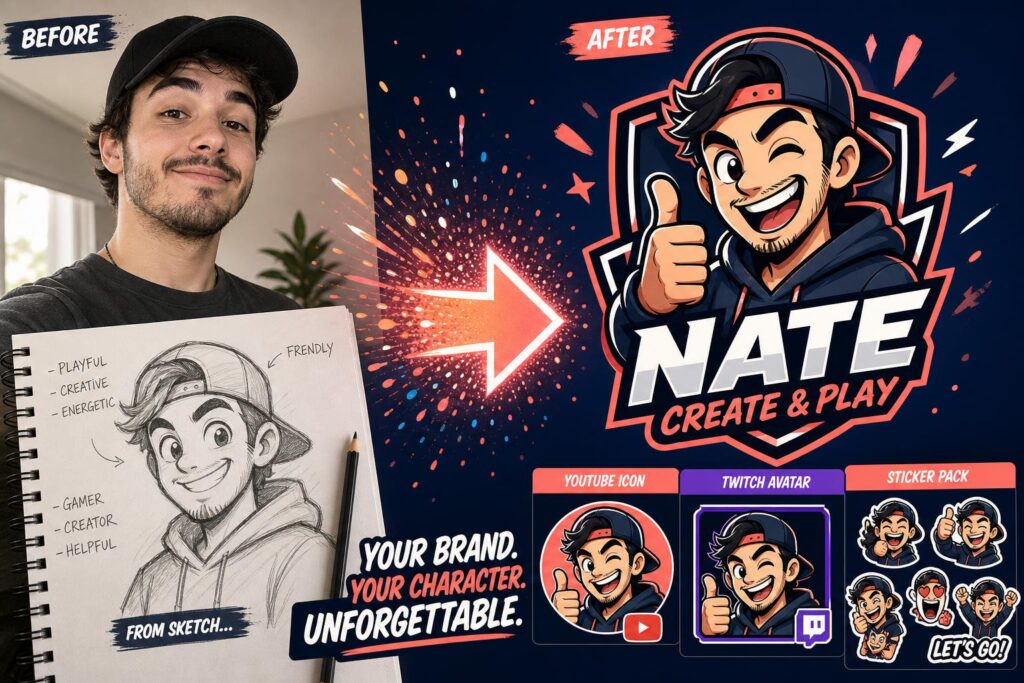
You're a YouTuber, a Twitch streamer, a podcaster, or a personal brand in the making. You have a face, a vibe, a style — but your channel icon is still a cropped selfie and your merch ideas are stuck in your head because you have no visual identity to print on anything.
Upload a portrait photo or a hand-drawn character concept you sketched. Cartoon Mascot style. Prompt: "Bold character mascot, social media creator, vibrant and energetic." The result expresses Excitement — personal, high-recall, and unmistakably human. As the LogoLounge trend report notes, mascots remind us of the thing brands often forget: we respond to humanity. Your mascot becomes your YouTube icon, your Twitch avatar, your sticker pack. It's not just a logo — it's a character your audience will recognize before they read your name.
Use Case 4 — Food & Beverage Brands: From Ingredient Photos to Warm Brand Character
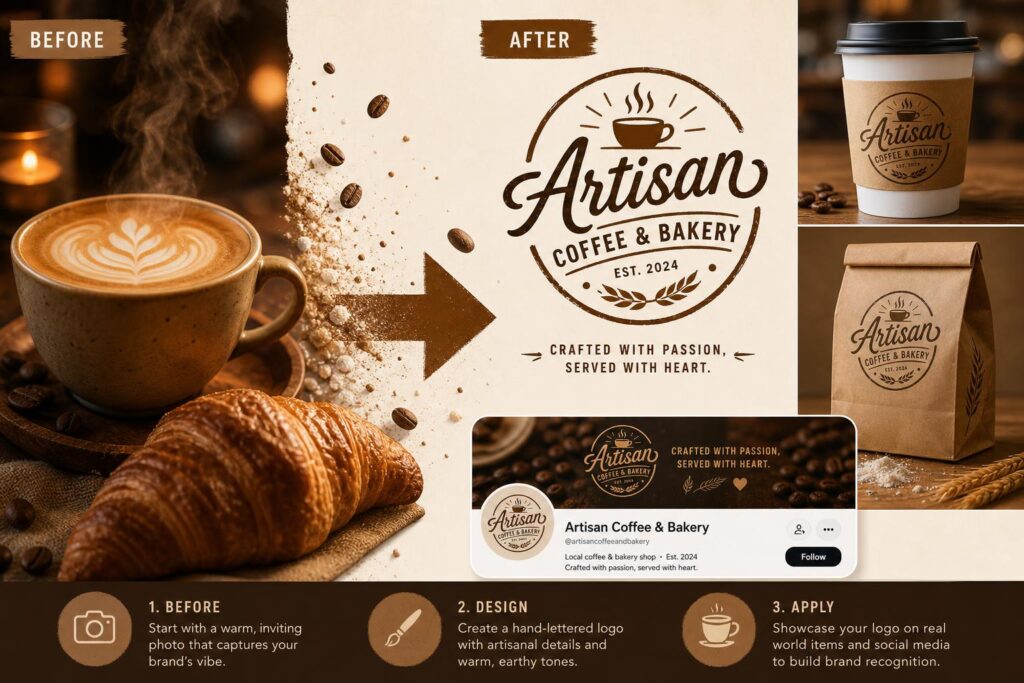
You run a café, a bakery, a food truck, or a specialty food brand. Your product is delicious. Your Instagram looks great. But your logo is a plain font, and your brand feels interchangeable with every other artisan food business on the block.
Upload a close-up of your signature dish, your best-selling drink, or even your shop front. Icon-style or Vintage. Prompt: "Cozy café icon, warm amber and dark brown, hand-lettered feel, welcoming and authentic." The output carries Sincerity — the emotional warmth that makes people choose your place over the chain café three doors down. Apply it to your coffee cups, takeaway packaging, menu cover, and social profile header.
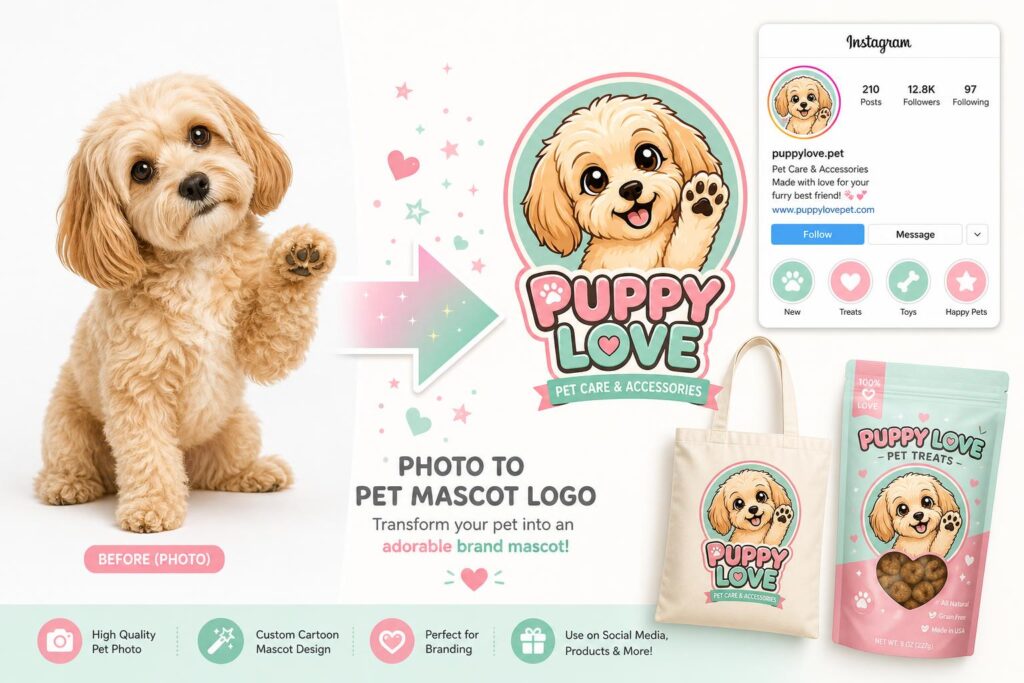
Use Case 5 — Pet Owners & Pet Brands: Turning Your Pet's Photo Into a Brand Character Mascot
Your cat or dog is already a minor celebrity among your followers. Or you sell pet products and you need a mascot that actually feels like the brand — not a stock clipart animal from 2008. Either way, the solution is sitting in your camera roll.
Upload a clear photo of the animal — ideally one with personality in the pose. Cartoon Mascot or Playful style. Prompt: "Cute cartoon pet mascot, pastel pink and mint, playful and friendly, pet care brand." You get a logo that expresses Sincerity at maximum emotional intensity — the kind of mascot people immediately want to follow, put on a tote bag, or buy merch featuring. This is one of the most popular use cases on The LogoCreator for good reason: it turns a personal connection into a brand character asset.
Use Case 6 — Fitness & Sports Brands: Bold Brand Character From Action Imagery
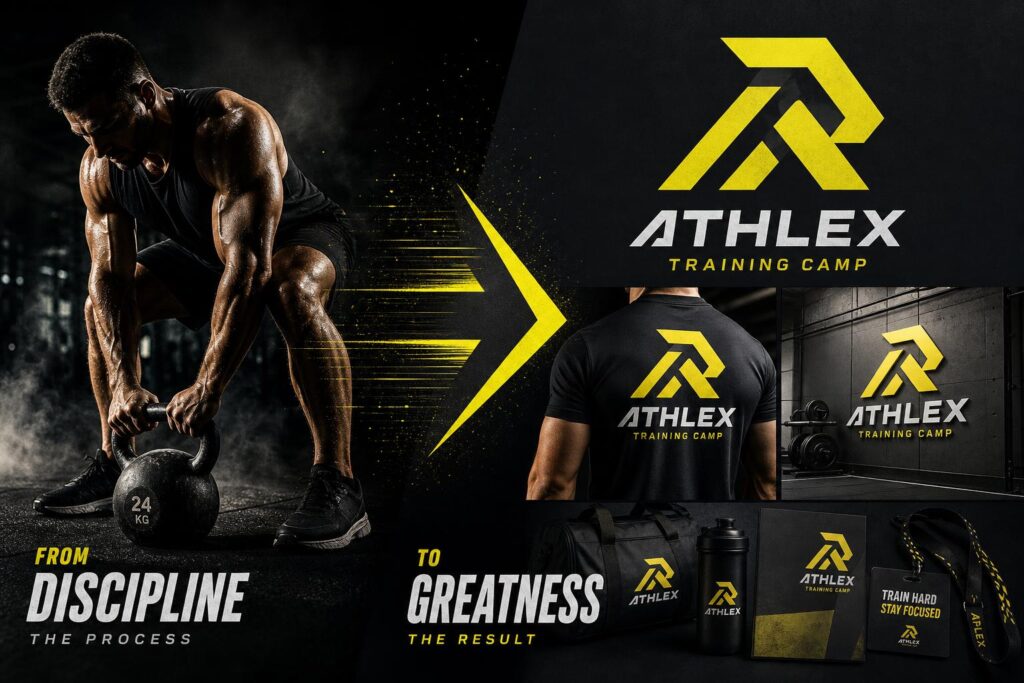
You're a personal trainer, a bootcamp founder, a sports equipment brand, or a gym owner. Your brand should feel like a pre-workout punch to the face. Instead, it feels like the default option on a fitness app template.
Upload an action silhouette, a piece of equipment, or an image with strong angular energy. Bold Geometric or Dynamic style. Prompt: "Bold athletic logo, strong angular lines, deep charcoal and neon yellow, powerful and motivational." The result hits Ruggedness — the exact brand character dimension that makes athletes trust a brand before they've even tried the product. That logo goes on training gear, gym walls, and camp branding materials.
Advanced Brand Character Tips — Getting More From Your Image to Logo Workflow
Here's the honest truth: the difference between a logo that looks generated and one that looks intentional is almost never about the tool. It's about how you use it. These three advanced strategies are the ones most tutorials skip — which is exactly why they're worth knowing.
Advanced Tip 1 — The Dual Brand System: Mascot + Wordmark From a Single Image
Every mature brand runs two visual systems simultaneously. There's the mark — the icon or mascot that works as a standalone symbol, perfect for profile pictures, app icons, and stickers. And there's the wordmark — the brand name combined with a simplified version of the mark, used on websites, business cards, and formal applications.
From a single reference image, generate two versions: Version A with a Mascot or Icon style (your graphic mark), Version B with a Minimal Monogram style (your wordmark). The visual DNA stays consistent — same source image, same brand character — but you now have a flexible system that works at every scale and formality level. This is the equivalent of a traditional brand's primary and secondary logo system, built in minutes instead of weeks.
Advanced Tip 2 — The Three-Version A/B Test Method for Brand Character Validation
Brand character should be validated by your audience, not chosen by your gut. Here's a clean workflow for making that happen:
- Generate three distinct style versions from the same image (Minimal, Vintage, Geometric)
- Create a side-by-side comparison image
- Post it to Instagram Stories, a community forum, or a client group with a single poll question
The question matters more than you might think. Don't ask "Which logo looks best?" — that invites aesthetic judgments that don't predict brand loyalty. Ask instead: "Which of these feels most like us?" That one-word change shifts your audience from critics into collaborators. After 50+ responses, you have real data to make a brand character decision that's grounded in your market, not just your preferences.
Advanced Tip 3 — Color Specificity: The Gap Between Generic and Character-Rich Brand Logos
Color is the single most under-specified variable in most prompts — and the biggest driver of brand character precision. Here's the gap in practice:
❌ Vague: "blue logo, clean style" ✓ Specific: "Deep navy blue with warm gold accents, sophisticated and trustworthy, premium brand feel"
A quick emotional color reference for your prompts:
| Color Direction | Brand Character Signal |
|---|---|
| Warm (red / orange / amber) | Passion, appetite, energy |
| Cool (navy / forest / slate) | Trust, calm, expertise |
| Earth tones (terracotta / sand) | Authenticity, craft, natural |
| High contrast (black / white / gold) | Sophistication, luxury, permanence |
| Bright accents (coral / mint / lemon) | Youth, creativity, approachability |
Common Brand Character Mistakes to Avoid When Using Image to Logo Tools
These five mistakes show up in roughly 95% of first-time users. Not because people aren't smart — but because nobody tells them in advance. Consider this your advance notice.
Mistake 1 — Uploading Cluttered Images That Kill Brand Character Clarity
The mistake: Uploading a photo with multiple subjects, busy backgrounds, or a complex scene.
The consequence: The AI's feature extraction gets split between competing elements, and the resulting logo has no clear focal point — which means no clear brand character.
The fix: Use remove.bg to strip the background before uploading, or crop the image down to a single dominant subject. The cleaner the input, the sharper the brand character output.
Mistake 2 — Using Vague Prompts That Produce Generic Brand Character
The mistake: Typing "logo" or "nice design" or "make it look professional."
The consequence: Without specific direction, the AI defaults to a statistical average of what logos look like — which means you get something forgettable that could belong to any brand.
The fix: Use the four-element formula from Step 3. At minimum, include a style adjective, a color direction, and a mood word. Even a 10-word prompt produces dramatically better brand character than a 2-word one.
Mistake 3 — Stopping at One Generation Without Exploring Brand Character Variations
The mistake: The first result looks "pretty good," so you use it.
The consequence: You miss the version that would have been exactly right — and you lose the market validation opportunity that comes from comparing multiple brand character options.
The fix: Generate at least three different style versions before deciding. The first version is a starting point, not a verdict.
Mistake 4 — Skipping Small-Size Brand Character Visibility Testing
The mistake: Approving the logo based on how it looks on a desktop monitor at full resolution.
The consequence: The logo becomes an unreadable smear at 32×32px — which is the exact size it appears in browser favicons, mobile notification icons, and social media thumbnails.
The fix: After downloading, immediately resize the logo to 50×50 pixels and check whether the brand character still reads clearly at that scale.
Mistake 5 — Using Photo-Filter Outputs as Brand Logos Instead of True Brand Character Marks
The mistake: Using an output that retains photographic texture, complexity, and gradients.
The consequence: The design looks great on screen but fails completely in print, embroidery, and scalable applications where logos need to be reduced to flat, simple marks.
The fix: Choose Geometric, Icon, or Minimal styles to ensure your output is a clean, scalable brand mark — not an artistic photo treatment. A logo needs to work at every size and in every medium.
Frequently Asked Questions About Brand Character and Image to Logo
Q1: What exactly is brand character, and how is it different from brand identity?
Brand identity is the visual system — logo, color palette, typography, design assets. Brand character is the personality underneath it — the human traits your brand consistently expresses: warmth, boldness, trustworthiness. Brand identity is the vehicle; brand character decides where it drives. A logo without brand character is just decoration. One built around brand character communicates something meaningful before a word is read.
Q2: What types of images work best with an image to logo converter?
Single-subject images with clean backgrounds work best. Product photos, pet portraits, headshots, object close-ups, and hand-drawn sketches all perform well. The rule: one clear subject, taking up most of the frame, against a background that doesn't compete. If your image doesn't quite get there, a quick crop or background removal tool usually fixes it.
Q3: Can I use the logos generated by image to logo tools for commercial purposes?
Yes. Logos generated through The LogoCreator can be used commercially — e-commerce, social media, packaging, print, and business cards. Before registering a trademark, run a standard availability check in your jurisdiction. That applies regardless of how the logo was created.
Q4: How is image to logo different from just applying an Instagram filter?
A filter changes how your photo looks but keeps the photo structure intact. When you turn photo into logo online free with an AI tool, something fundamentally different happens: the AI extracts the core subject, strips photographic detail, and reconstructs it as a clean, scalable brand mark. The output isn't a photo anymore — it's a logo, with completely different applications.
Q5: How many logo variations can I generate from a single image?
Unlimited. Every style and prompt combination produces a distinct output from the same image. A Vintage prompt and a Geometric prompt on the same photo produce logos that share visual DNA but express completely different brand character dimensions. Generate at least three to five variants before deciding, and use the A/B test method above to let your audience help choose.
Q6: Can I turn a sketch or hand-drawn concept into a brand character logo?
Absolutely. Photograph your sketch with good lighting against a white background and upload it directly. You can effectively turn photo into logo online free starting from nothing more than a napkin drawing — pair it with a prompt like "professional vector logo, clean lines, your brand character direction" and the AI turns your hand-drawn concept into a polished brand mark without losing what made the original idea interesting.
Conclusion — Your Brand Character Is Already in the Photo You Have Right Now
Here's the thing about brand character: it's not invented in a design studio. It already exists — in the way you talk about your product, in the thing that made you start the business, in the photo on your phone that captures the aesthetic you've always had in mind. The problem was never a lack of brand character. It was the lack of a tool that could take what already exists and translate it into a visual mark. That tool now exists. And it starts with a single upload. The brands people remember in 2026 won't be the ones that spent the most on design. They'll be the ones that figured out their brand character first — and then built every visual touchpoint around it, consistently, across every platform where their audience shows up.
You know what your brand should feel like. You probably even have a photo that captures it. Not sure which image to start with? Try a photo of your product, your pet, a sketch you made on paper, or an old logo you want to modernize. Upload it to The LogoCreator and see what your brand character actually looks like — in under 60 seconds, no design skills required.
Your brand character is already there. You just need the right tool to bring it to the surface.